Open-sourcing an on-device Pokémon card scanner that names the exact print
We weren't happy with the Pokémon card scanners out there. Most of them get the card roughly right and the print wrong, and the better ones charge a monthly subscription for it. So we set out to raise the bar and give the result away. Today we're releasing two things, both free and open: a card scanner and the dataset it's built on.
The scanner is a set of open-source models that name the exact print of every card in a photo, by set, number and language, across all sixteen languages Pokémon cards have been printed in. The exact print is what a collector actually needs: the Base Set Charizard and its anniversary reprint share a painting, but they're different cards, worth very different amounts. The scanner is small enough to run entirely on an iPhone, offline, and names a whole binder page of cards in a few hundred milliseconds. It's the scanner in PennySleeve, our free iPhone app.
Try it on your own machine:
pip install "cardcorpus-scanner @ git+https://github.com/cardcorpus/pokemon-card-scanner"
cardcorpus-scan serve
That opens a page where you can drop in a photo or use your webcam. Your photos stay on your computer.
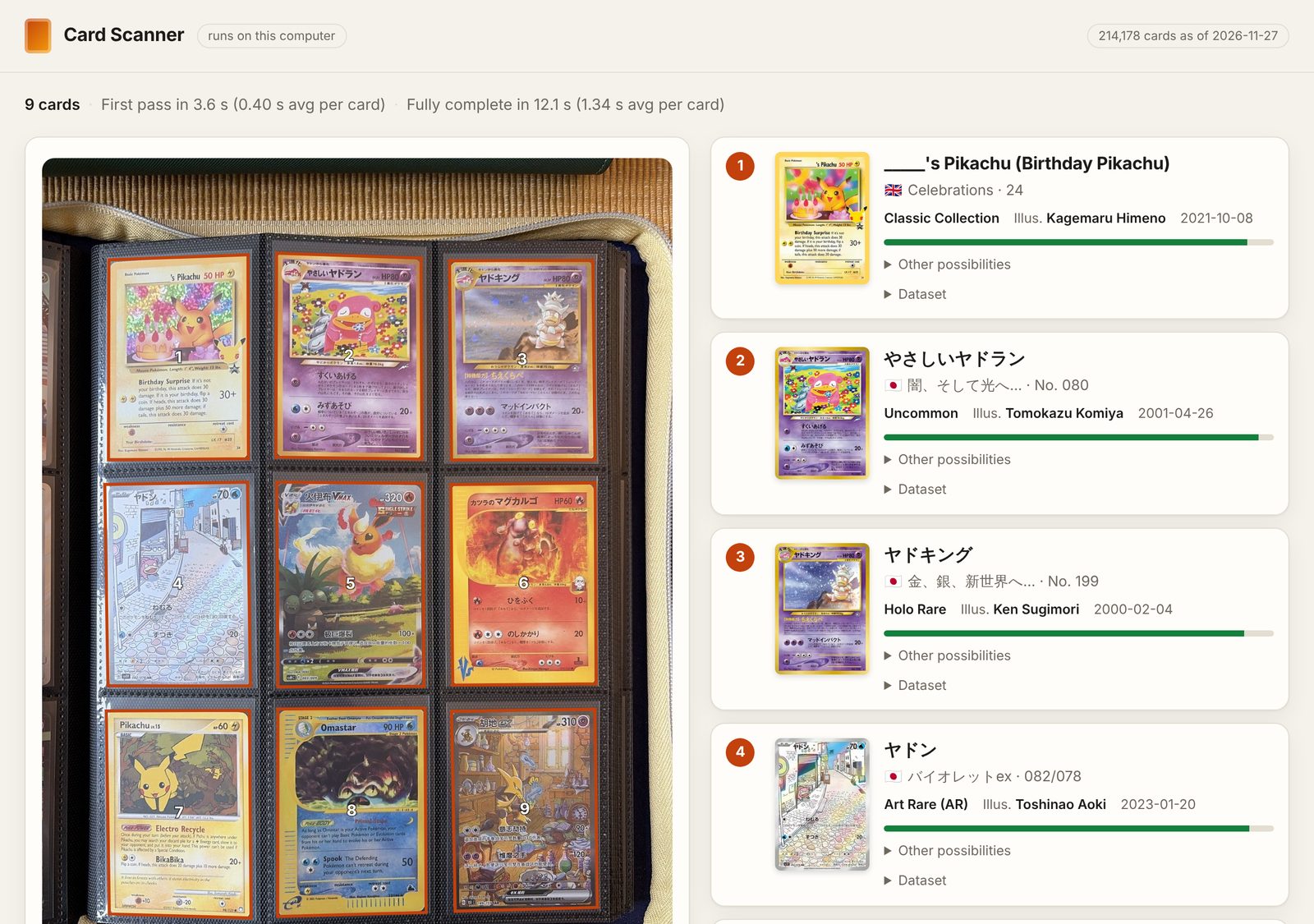
Or use it from your own code:
from cardcorpus_scanner import Scanner

scanner = Scanner.load()
result = scanner.scan("binder-page.jpg")      # a path or a PIL image
for card in result["cards"]:
    best = card["candidates"][0]
    print(best["name"], best["set_name"], best["number"], best["print"], best["sim"])
The code is Apache 2.0 on GitHub, with the models and index on Hugging Face.
One illustration, 45 prints
Naming the illustration on a card is the easy part. Naming the exact card, the exact print, is the hard part. Mitsuhiro Arita's Charizard first appeared in Japan's Base Set in 1996. It has since been printed 45 times, in 14 languages: in the English Base Set and its reprints, in a Legendary Collection with a reverse foil, in anniversary sets with gold borders and new numbers, in starter decks and promo packs.
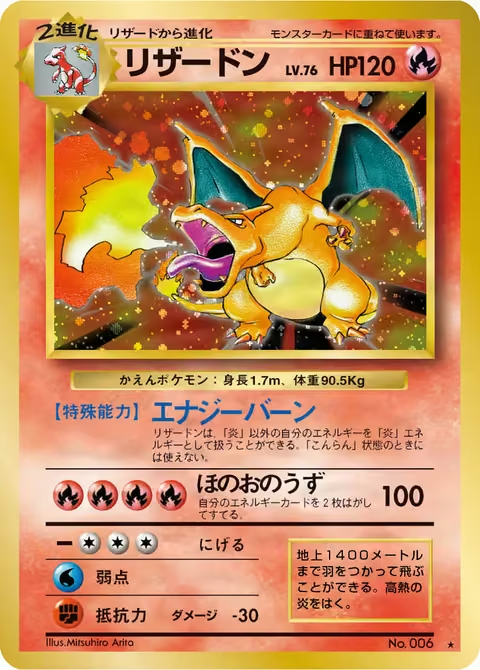
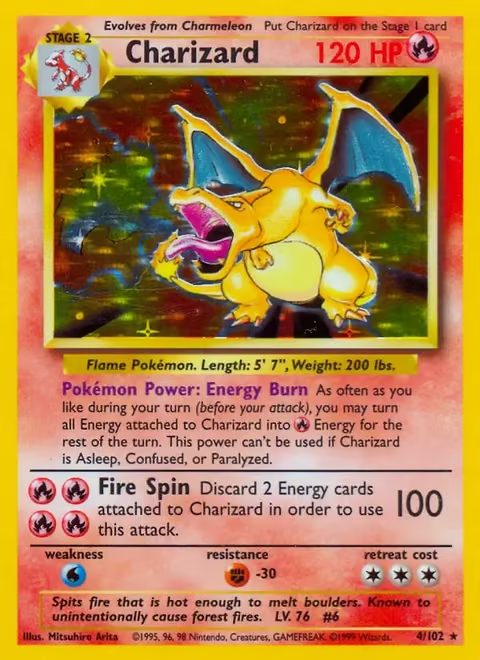
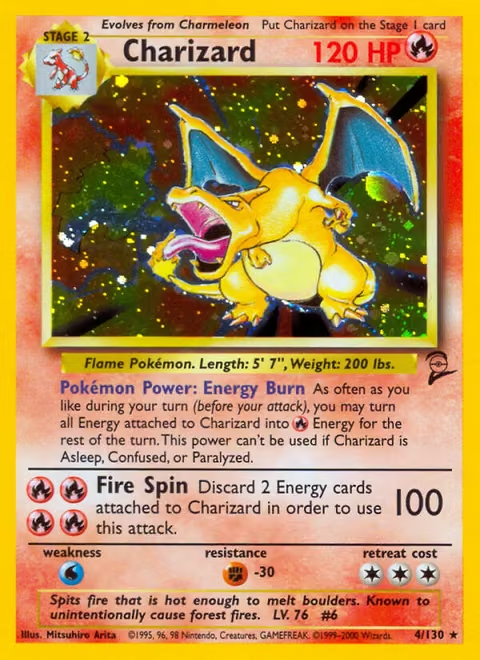
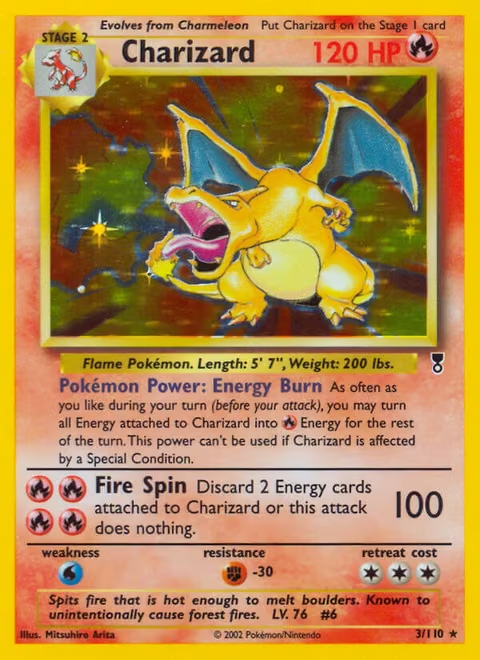
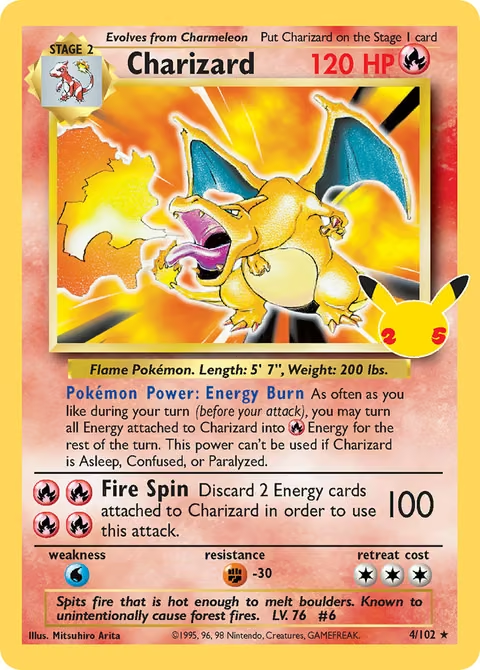
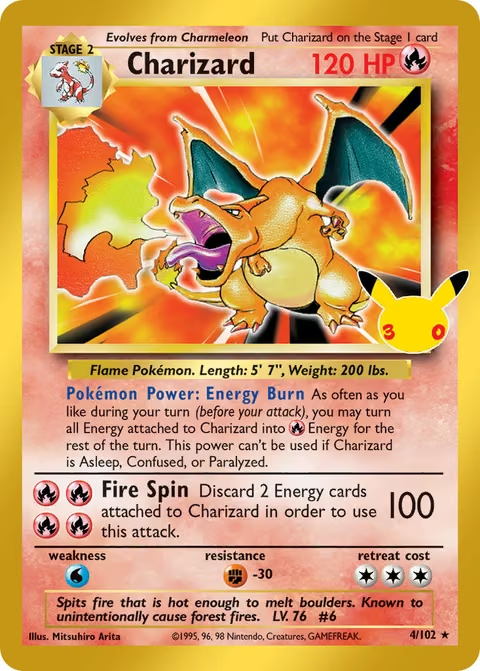
To an image model these are nearly the same picture. Before training anything, we tried an off-the-shelf model, Apple's MobileCLIP, on single, already-cropped card pictures put through camera-like distortion: tilt, blur, glare and compression. It found the right illustration for 74% of cards, but the right print for only 44%, and for 10% of Japanese cards, because Japanese decks and gift sets reprint the same art so often. Closing that gap is what the rest of the scanner is for.
How it works
Each step is its own small model:
- Find the cards. QuadDet is our own detector, built on a small ImageNet-trained MobileNet and trained on photos holding anything from one card to a hundred. It marks the centre of every card and its four corners, so a tilted card on a crowded binder page, or one half lost under the glare of a sleeve, is still cut out cleanly. We tried other detectors for this job, including ones several times its size, and QuadDet beat them while staying tiny: 1.4 million parameters, 2.4 ms on an iPhone.
- Match the illustration. The card is straightened and fingerprinted by a fine-tuned DINOv3, and the fingerprint is compared with pictures of 214,141 cards.
- Read the corner. A small reader reads the collector number, and the set code and language mark printed beside it, such as
MEW EN. - Tell the prints apart. A print picker (a fine-tuned PE-Core) looks at the whole card and scores the prints of that illustration. Then a verifier lines the photo up with each candidate's own picture and compares only the places where they differ: the set symbol, the number, the copyright line. It skips pixels that glare has washed out, so a reflection doesn't count against the right print.
- Check the copy and the language. It looks for a 1st Edition stamp on older English cards, and a small model reads which language the text on the card is in.
On 641 cards from vintage binder pages, matching the illustration alone got 494 prints right. With the corner read, the picker and the verifier behind it, 597, and today's release gets 628.
How often it's right
Here is PennySleeve's scanner on photos the models never saw in training. A card counts as right only when the first pick is the exact print. "Right, or says it isn't sure" also counts the cards where the scanner flagged its own doubt and asked:
| photos | exact print, first pick | right, or says it isn't sure |
|---|---|---|
| vintage binder pages, 641 cards | 98.0% | 98.9% |
| a session of phone photos, 330 cards | 91.5% | 97.6% |
On a set of deliberately hard real-world photos, many of them small, blurred or shot at an angle, it still names the exact print for 87% of cards.
When it isn't sure, it says so
What annoyed us most about other scanners was confidence. They'd pick one print of a card, seemingly at random, and present it as the answer. We wanted ours to be right much more often, to say when it isn't sure, and then to tell you how to settle it.
Usually a print can't be told apart because the part that differs is hidden: a corner under a binder ring, a set symbol blurred, a number lost in glare. When that happens PennySleeve outlines the card in orange and shows the two or three prints it's between, side by side, each with a line saying what to look for:
| how to tell | |
|---|---|
| Base Set | No set symbol, and a number out of 102 |
| 1st Edition | A 1st Edition symbol, and no shadow around the picture |
| Shadowless | No shadow around the picture |
| Unlimited | A shadow around the picture; the main run |
| 4th print | Like Unlimited, but a smaller run with a 1999-2000 copyright year |
| Base Set 2 | A Poké Ball with a "2" as the set symbol, and a number out of 130 |
| Legendary Collection | The Legendary Collection set symbol, and a number out of 110 |
| Celebrations | A 25th anniversary logo |
| Holo or not, in any set | The picture shines; the rest of the card doesn't |
You settle it with one tap. On the phone session, 20 of the 25 wrong first picks came back marked not sure, and when the first pick is wrong, the right print is in the top three about two times in three.
First answers come fast
Nobody wants to hold up a binder page and wait. On an iPhone Air:
- The camera outlines cards live, at 22 ms a frame.
- Every card on a page is found and named by its illustration in about a third of a second.
- The print checks then run behind those first answers, doubtful cards first, and are usually done by the time you've looked at the first card. A full page of 9 to 12 cards, every check included, takes under four seconds.
This release is the Python reference of the same steps PennySleeve runs on the phone, and it matches the app: 630 against the app's 628 on the vintage pages, 300 against 302 on the phone session.
How it was trained
The scanner started on 4,000 synthetic binder pages, piles and single cards made from card pictures, under sleeves and toploaders, with glare, blur and dim light. Then came real photos, chosen to be as hard and as varied as we could find: single cards, a handful on a table, binder pages, and spreads of a hundred; from good phones and poor webcams, at every resolution, sharp and blurred.
We built our own review tool for them. At first every card's four corners were clicked by hand, 5,705 of them. As the models improved, the job became mostly accepting their answers and fixing the few they got wrong: 9,489 photos and 39,473 labels, 16,976 of them a person's decision. Now it has turned around, and the models go back over our hand labels and catch our mistakes. Four of the labels in our main test set were wrong, and the scanner was the one that read the card right.
The models themselves were raced, not picked. Seven open backbones were each fine-tuned with the same effort and judged on the same fixed test sets; DINOv3 won the matcher and PE-Core became the print picker. Every change after that ran against those test sets before it shipped. The models were trained on rented GPUs on RunPod, and all of the training so far cost about $200 in total.
How it compares
We ran every other open-source card scanner we could get working on 2,727 labelled cards from our own photos. Our first pick was the exact print for 94.5% of them; the best of the others got 75.7%, using a model about twenty times the size of our matcher, too big to run comfortably on a phone.
Then we gave the others' matchers our catalog of card pictures, and the best jumped to 87.1%. Most of the difference is the data, which brings us to the second release. These are our photos and our measurements, so take them as that, not as an independent benchmark.
Every language the cards have been printed in
We wanted the scanner to know every Pokémon card in existence, not just the English ones. That's sixteen languages: English, Japanese, Simplified Chinese, Korean, Traditional Chinese, Thai, Indonesian, French, German, Italian, Spanish, Portuguese, Latin American Spanish, Dutch, Russian and Polish.
More languages make scanning harder. A French Pikachu is the English Pikachu translated: same painting, same layout, different words. The scanner was trained mostly on English, Japanese and Simplified Chinese cards, and the hardest pairs are the ones that look alike. Simplified and Traditional Chinese share most of their characters, and when a card's edges are covered and its number can't be read, there's very little left to go on. Spain's and Latin America's Spanish prints carry the same words, and usually only the code in the corner, PBL ES or PBL LA, tells them apart.
So by default the scanner matches against English, Japanese and Simplified Chinese, and you can change that at any time (--catalog german, or --catalog all). The language model always runs, whatever you've picked. If you scan a Spanish card with only English turned on, it tells you the card looks Spanish and offers that print, but it never switches on its own.
The dataset
Most card scanners are built on one of a handful of public card datasets. We went through all of them, and none had what we needed: which card in Korean is which card in English, which cards are reprints and which only share a painting, which copies of a card were printed. So we built it, and it's the second thing we're releasing: CardCorpus.
It covers sixteen languages, every language Pokémon cards have been printed in:
- 2,244 sets and 223,006 cards
- 323,739 copies of those cards: 1st Edition and Unlimited, holo and reverse holo, stamped promos and the like
- 20,161 paintings, each with every card that prints it
- 2,649 ways a promo was given out, from magazine inserts to tournament prizes
- 1,025 Pokémon, 428 characters and 495 artists
What makes it different is the links. Every card knows the same card in the other languages, its reprints, its stamped copies and the other cards that share its painting:
It's entirely free, under CC BY 4.0, and there are three ways to get it:
- The API at pokemon.cardcorpus.com/v1: static JSON files, one per set plus files for Pokémon, artists, paintings and promos, each with a JSON Schema. No key, no sign-up.
- A snapshot: the latest release on GitHub, every file in one zip of about 37 MB.
- The repository: clone cardcorpus/pokemon-card-dataset and read the files straight off disk.
A card browser takes three requests: the sets, a set's cards, and a picture.
import requests

API = "https://pokemon.cardcorpus.com/v1"
sets = requests.get(f"{API}/sets/english.json").json()["sets"]
base = requests.get(f"{API}/sets/{sets[0]['id']}.json").json()
for card in base["cards"][:3]:
    image = card["picture"]["front"]["image"]
    print(card["name"], card["number"]["printed"], f"https://img.cardcorpus.com/s1/480/{image}.avif")
The docs take it from there.
Built with a swarm of agents
Almost all of the work, from the research to the code to the training runs, was done by Claude, Anthropic's model, with a person deciding what mattered, looking at samples by eye and saying no a lot. It ran on Claude's new Projects feature: a coordinating Claude takes each request, splits it into threads, one per piece of work, and keeps track of what each is doing. More than 500 threads have run so far, and they have merged more than 1,600 pull requests, each one also reviewed by GPT Sol.
A swarm of agents researching card history will, left alone, produce a confident mess. Ours did, early on. Most of the project's engineering went into keeping them on track:
| what went wrong early | what stops it now |
|---|---|
| Broad assumptions: "same number in two languages means same card" | Every link between cards is decided one card at a time, from an outside page or picture that was opened and cited |
| Links made up to fill a gap | A link with no evidence doesn't exist; where research can't settle one, it's left out |
| One card's answer stretched to a whole set | Machine-made batches are sampled by eye, and if any of the sample is wrong, all of it is checked |
| One source taken as the truth after it had been shown wrong | Every source's value is kept beside ours, and a source that disagrees with a decided value goes to review instead of overwriting it |
| New sets marked done with their foreign prints missing | The compiler refuses them until each is resolved, or proven not to exist, or not out yet |
What we released is the output of a much larger internal record. Behind every value in the API sits what every source said about it, the decision that was made, the note on why and the page it cites. That's there for the next agent as much as for us: one that opens a card later sees why each value is what it is, and doesn't change a researched answer on looser evidence.
A compiler with guardrails, to stop agents getting lazy. A compiler written in Rust builds every output from that record, and refuses to when the record breaks a rule. A few of them:
- Every new set must resolve its prints in the other languages, or record that it's been proven they don't exist, or that they aren't out yet. Those open questions are retried each time the check for new releases runs, for about twelve weeks, before they're closed.
- Every new card needs a recorded search of the whole catalog, every language, for its other prints, and every new promo a description and how it was given out.
- A pictured card can't lack its illustrator, rarity or Pokémon, and two links can't contradict each other.
- A value guessed without a picture is asked about again as soon as its card gains one.
- A card's public id never changes once published.
The links show the result: 182,203 decided one card at a time, 169,923 of them citing a page on one of 94 sites, and about 735,000 more that follow from those (if a German card is the English card, and the English card is the Japanese one, the German card is the Japanese one too). A typical decision:
Indonesian Mega Evolution 164/126 is Japanese Mega Symphonia 082/063 Rare Candy: an eye check of the art window beside a mirrored copy found the same Rare Candy, blue wrapped candy on pink rays; not mirrored. No other Indonesian set prints it.
Different set, different number, same card, which a rule would have missed. None of this makes the data perfect. It does mean every value rests on a reason that was checked, and a mistake, once found, is fixed at the source and stays fixed.
What it doesn't do yet
The scanner names the print, not its condition, and its language model doesn't yet know Dutch, Russian or Polish. The data is thinner for some old promos and regional products; pennysleeve.app/coverage compares our sets with those known to be printed in each language. If you find a mistake, please open an issue with a link to a page or picture that shows it.
Get it
- Run the scanner from cardcorpus/pokemon-card-scanner, with its models and index on Hugging Face.
- Use the data at pokemon.cardcorpus.com/v1, from the latest release, or start with the quickstart.
- Browse it all in PennySleeve, the free app and website built on both.
The scanner's code is Apache 2.0. The matcher is a fine-tune of DINOv3 and under the DINOv3 License; the other models are Apache 2.0. The dataset and the scanner's index are CC BY 4.0. Built with DINOv3.
Pokémon and its card pictures belong to Nintendo, Creatures, GAME FREAK and The Pokémon Company, and older cards also to Wizards of the Coast. CardCorpus is a fan project and isn't affiliated with or endorsed by any of them.